
Bring Damaged Photos Back to Life with AI
Ready for Generating
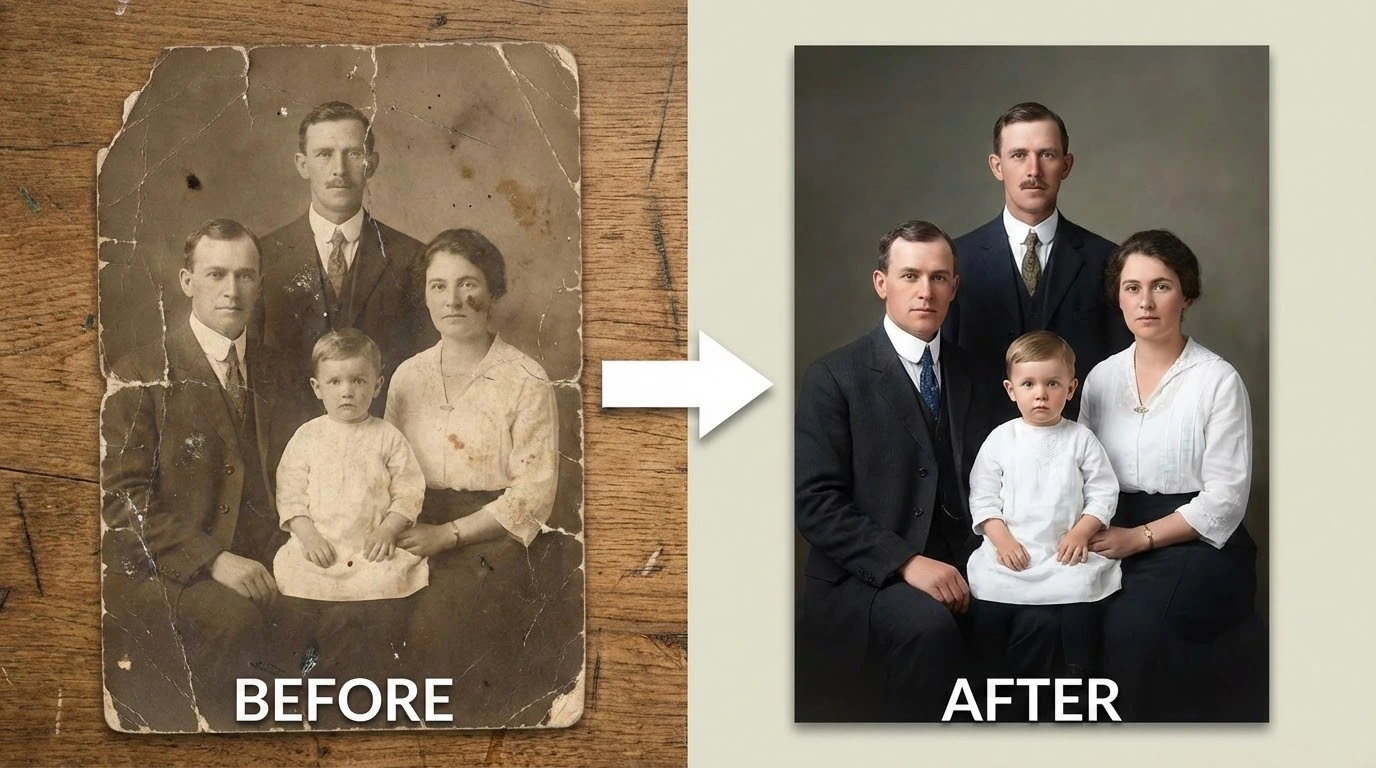
What the AI Repairs in Your Old Photos
Our photo repair engine analyzes each image at the pixel level, identifying damage patterns and applying targeted reconstruction to recover what time has taken away.
Physical Damage Reconstruction
Scratches, creases, tears, and surface abrasions are mapped across the entire image. The AI fills each damaged zone by sampling surrounding textures and patterns, rebuilding the missing content so repairs blend invisibly into the original photograph.
Age-Related Color Recovery
Decades of storage cause photos to yellow, fade, and shift in tone. The AI corrects these age-related color drifts, restoring natural skin tones and scene colors while keeping the result grounded in the original era — not artificially over-saturated.
Face and Detail Sharpening
Soft focus, motion blur, and lost fine detail are recovered through AI-driven upscaling. Facial features, background elements, and text become crisp and legible again while the photograph retains its authentic period character.
Why AI Photo Repair Beats Manual Retouching
Professional photo restoration by hand can take hours per image. AI completes the same repairs in seconds with results that hold up to close inspection.
Full-Image Damage Scanning
Every scratch, stain, and blemish is detected automatically. The AI maps the entire photograph before making any changes, so no damage area is overlooked — even subtle spots that are easy to miss by eye.
Authentic Look Preserved
Repairs are applied only where damage exists. The original composition, film grain, and period-specific aesthetic remain untouched, so the restored photo still feels like the moment it captured — just without the deterioration.
Handles Severe Deterioration
Heavy water damage, deep fold lines, mold staining, and large missing sections are all within scope. The AI uses contextual inference to reconstruct areas where significant image data has been lost entirely.
Works Entirely in the Browser
No software to install and no plugins to configure. The repair process runs in the cloud, so you get full results on any device — desktop, tablet, or phone — without touching your local storage.
Efficient for Large Collections
Digitizing an entire family album or archival set? Process images one after another without reconfiguring settings between each photo. Consistent output quality across every image in the batch.
Repair an Old Photo in 3 Simple Steps
The process is straightforward — upload your damaged photo, let the AI do the work, and download a clean restored copy.
Upload the Damaged Photo
Choose a scanned or photographed copy of your old picture. JPG, PNG, and WEBP formats are all accepted. Scanning at 300–600 DPI before uploading gives the AI more detail to work with and produces sharper results.
AI Detects and Repairs All Damage
The engine identifies every type of deterioration — scratches, fading, tears, water stains, and blur — then applies precise repairs to each area. Color balance and sharpness are corrected in the same pass.
Download Your Repaired Photo
Review the before-and-after comparison, then download the restored image at full resolution. Print it, frame it, or share it with the people who will appreciate it most.
How People Are Using AI to Save Their Family Photos
I had a box of my great-grandparents' photos that were badly scratched and faded. After uploading them here, the repairs were so clean that my relatives couldn't believe they were the same pictures.
Nora F., Family Archivist
Nora F.
Family Archivist
I work with 1930s and 1940s archival photographs regularly. The water damage and yellowing on some of these prints was severe, but the AI handled them without leaving any visible artifacts. Saved me enormous time.
Elliot M., Historical Researcher
Elliot M.
Historical Researcher
I use this for client restoration jobs when the damage is too widespread to fix manually in a reasonable timeframe. The output quality is consistently high and the turnaround is instant.
Priya S., Freelance Photo Editor
Priya S.
Freelance Photo Editor
A client brought me her parents' 1950s wedding album — every photo was creased and faded. I ran them through this tool and the results were stunning. She cried when she saw them. That's the reaction you want.
Ben A., Portrait Photographer
Ben A.
Portrait Photographer
I've tested several restoration tools for my family history blog. This one stands out because it doesn't over-process — the repaired photos still look like old photographs, just without the damage. That authenticity matters.
Celia R., Genealogy Blogger
Celia R.
Genealogy Blogger
We integrated this into our digitization pipeline for a regional archive. It handles decades of deterioration reliably and preserves the historical integrity of each image. It's now a standard step in our workflow.
Marcus T., Digital Collections Manager
Marcus T.
Digital Collections Manager
Common Questions About AI Photo Restoration
Repair Your Old Photos — Free to Try
Upload a damaged or faded picture and see what AI can recover. No account required for your first repair — results in seconds.