
AI Watermark Remover
Ready for Generating
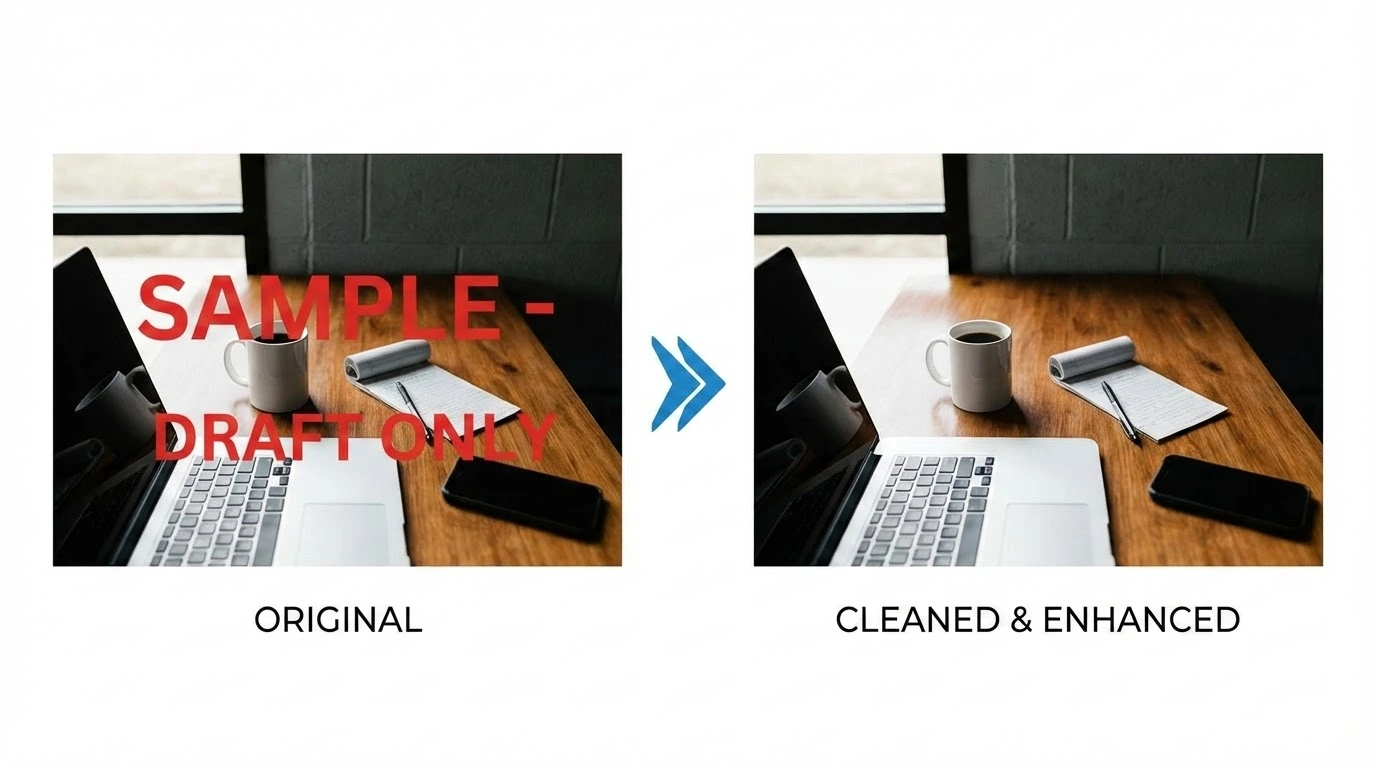
Inside the AI Watermark Remover
Detection, reconstruction, and blending all happen in a single forward pass — the AI Watermark Remover separates the mark from the photograph and rebuilds the layer that was hiding underneath.
Targeted Mark Detection
The AI Watermark Remover sweeps the frame for the typical watermark signature — translucent washes, hard-edged logos, repeating diagonal text, corner date stamps — and isolates the region down to the pixel. Only the pixels that belong to the overlay are flagged, so the underlying photograph stays exactly where it was.
Context-Aware Inpainting
Once the mark is masked, the AI Watermark Remover samples neighboring texture, color gradients, and structural lines, and rebuilds the missing region with consistent grain and continuity. Even text crossing a busy background or a face comes back without a smudge where the watermark used to live.
Original Quality Preserved
The AI Watermark Remover keeps the source resolution, color profile, and fine detail untouched outside the watermark zone. Inside the zone, the reconstructed pixels are tuned to match the surrounding sharpness, so a single look at the export does not reveal where the mark used to be.
Reasons to Reach for This AI Watermark Remover
Built specifically for watermark removal, this AI Watermark Remover keeps the photo intact while taking the overlay off.
Every Watermark Style Covered
Translucent washes, opaque logos, hard text stamps, tiled corner-to-corner repeats, and slanted overlays all clean up under the same workflow. The AI Watermark Remover adapts the inpainting approach to the watermark style it actually detects in your photo.
Bulk Cleanup in One Session
Load a folder's worth of images and let them flow through back-to-back. The AI Watermark Remover treats each file as its own job, so an archive of stock previews or a stack of supplier-stamped product shots clears in a single sitting.
Runs Entirely in the Browser
Nothing to install, no extensions, no desktop app. Open the page, drop in a photo, and the AI Watermark Remover handles the work on the server while you wait — works the same on a laptop, a tablet, or a phone.
Under-Ten-Second Turnaround
Most photos exit the queue in under ten seconds, even high-resolution sources. Dedicated GPU capacity keeps the AI Watermark Remover responsive whether you process one image or fifty.
Private by Default
Uploads travel over an encrypted channel and are removed from our servers shortly after the job finishes. The AI Watermark Remover does not retain your files, share them with third parties, or feed them into model training.
Free Daily Credits
Try the AI Watermark Remover without setting up an account. Each visitor starts with daily credits, and upgrading buys a higher quota plus priority lane access when traffic is heavy.
Three Steps to a Clean Photo With the AI Watermark Remover
The full workflow fits on a single screen — upload, wait briefly, and pull down the clean version.
Drop in the Watermarked File
Drag a photo into the upload zone or pick it from your device. JPG, PNG, and WEBP files up to 10MB are supported, and you can queue multiple files for a single session.
Let the AI Lift the Mark
Detection, masking, and inpainting all happen automatically. You never have to draw a selection, brush over the watermark, or set a tolerance — the AI handles the entire decision tree.
Preview and Save the Clean Output
Inspect the result side-by-side with the original, run a second pass if you want to refine a stubborn mark, and download the final image. The export keeps the original format and resolution.
What Users Tell Us About the AI Watermark Remover
Notes from people who quietly built our AI Watermark Remover into their image-cleanup routines.
I use it to clean preview-grade scans from a couple of older archives before reprinting. Marks lift off, the grain underneath is rebuilt convincingly, and clients can't tell anything was ever there.
Brianna F., Wedding Photographer
Brianna F.
Wedding Photographer
We inherited a content library full of legacy supplier marks. The AI Watermark Remover plowed through several hundred photos in one afternoon and the consistency surprised everyone on the team.
Lucas P., Brand Marketing Lead
Lucas P.
Brand Marketing Lead
I uploaded a holiday photo with a diagonal text stamp running across the whole frame and it came back spotless. Even the cloud texture behind the watermark looks natural.
Yuki H., Lifestyle Content Creator
Yuki H.
Lifestyle Content Creator
Our supplier ships product shots with a logo plastered in two corners. This is the first tool I've used that pulls them off without smearing the packaging color or the gloss on the bottle.
Marco T., DTC Store Operator
Marco T.
DTC Store Operator
I had low expectations after burning hours in Photoshop on similar jobs. The inpainting here held up even on a fully tiled overlay — the reconstructed area matches the photo grain almost too well.
Reema A., Graphic Designer
Reema A.
Graphic Designer
We push around eighty cleanups every week through this tool. Output is consistent, the turnaround is short, and we never have to babysit a job. It earned its spot in our weekly checklist.
Theo S., Social Operations Manager
Theo S.
Social Operations Manager
AI Watermark Remover — Common Questions
The questions teams and creators ask before running their archive through our AI Watermark Remover.
Run the AI Watermark Remover — First Job on Us
Drop in a marked photo and the AI Watermark Remover ships a clean version back within seconds. No sign-up gate on your first run.