
AI Photo Retouching
Ready for Generating
Inside the AI Photo Retouching Workflow
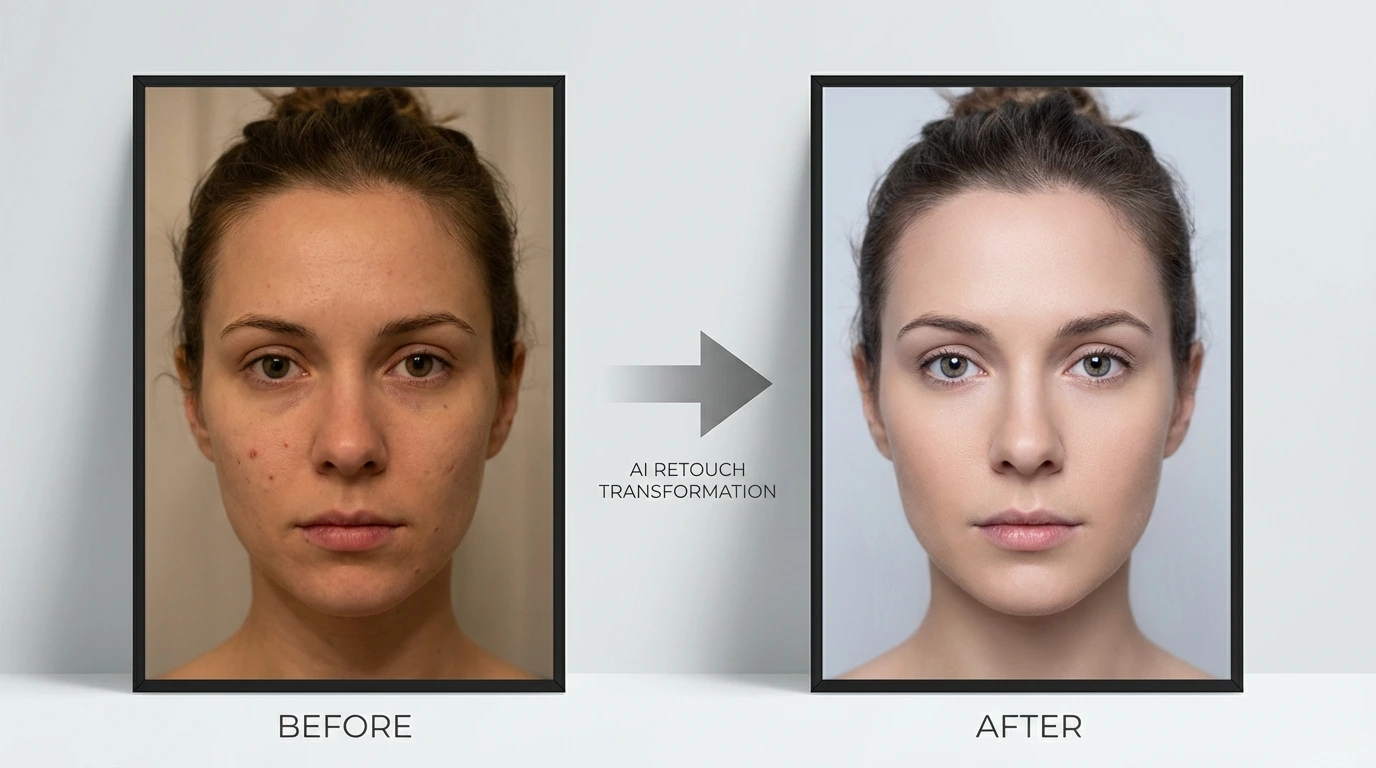
Skin reading, correction, and final sharpening all happen as a single pass — the AI Photo Retouching tool handles the kind of decisions a professional retoucher makes in Photoshop, automatically.
Surface-Level Skin Mapping
Before touching a pixel, the AI Photo Retouching tool maps the face — reading pore density, sebaceous patches, uneven melanin, and temporary blemishes separately from permanent structural features. That distinction is what separates a natural edit from an over-processed one: only the imperfections move.
Targeted Corrections Applied Together
Spot blemishes are lifted, skin luminosity is evened, eye whites are gently clarified, teeth tones are balanced, and any harsh specular patches are softened — all in one forward pass. The AI Photo Retouching tool is trained on professional retouch workflows, so each correction is calibrated against the others rather than applied in isolation.
Original Character Kept Intact
Micro-texture, individual hair strands, laugh lines that belong, and the subject's skin tone are all left where they were. The AI Photo Retouching tool ends its work at the point where the person still clearly looks like themselves — polished but not plasticky, corrected but not composited.
Reasons to Use This AI Photo Retouching Tool
Speed, subtlety, and versatility — the combination that earns AI Photo Retouching a spot in everyday creative workflows.
Photoshop-Grade Finish Without the Learning Curve
A retoucher in Photoshop typically takes ten to thirty minutes per portrait — frequency separation, spot healing, dodge-and-burn, and a final sharpening pass. The AI Photo Retouching tool compresses that into a few seconds and delivers a result that holds up next to the manual version.
Looks Like a Retouch, Not a Filter
Heavy presets flatten faces into the same wax-doll look. The AI Photo Retouching tool adjusts per-face — respecting natural skin tone, preserving micro-contrast under the eyes, and softening only the surface irregularities that a retoucher would actually target.
Holds Up Across All Skin Tones and Lighting Setups
From a softbox-lit headshot to a golden-hour outdoor portrait to a harsh office overhead — the AI Photo Retouching tool adapts its correction envelope to the specific light and melanin levels in each image rather than applying a universal curve.
No Editing Background Needed
Upload the photo, wait a few seconds, and pull down the corrected version. There are no layers, no masks, no blend-mode decisions. The AI Photo Retouching tool was built so anyone — photographer, founder, social manager — can ship a polished portrait without opening a desktop editor.
From Raw Snap to Polished Portrait in Three Steps
The entire AI Photo Retouching workflow lives on a single screen — upload, wait briefly, save.

Drop in the Photo
Pick the image you want retouched. The AI Photo Retouching tool accepts JPG, PNG, and WEBP files up to 10MB — portraits, headshots, group photos, and selfies all work.

AI Reads and Corrects
Detection, skin mapping, and targeted retouching all run automatically. Spot blemishes lift, luminosity evens, and shadows open up — the AI Photo Retouching tool makes the full set of corrections without you touching a slider.

Preview and Save
Inspect the result side-by-side with the original, and download the finished portrait. The export keeps the source resolution and file format, so it slots straight into your delivery pipeline.
What Users Tell Us About AI Photo Retouching
Notes from photographers, creators, and operators who brought AI Photo Retouching into their everyday work.
I used to spend twenty minutes per headshot on frequency separation alone. The AI Photo Retouching tool closes that gap — the skin pass is clean enough that I go straight from the AI result to sharpening and delivery.
Naomi C., Commercial Portrait Photographer
Naomi C.
Commercial Portrait Photographer
I hate the plastic skin that every app seems to go for. The AI Photo Retouching result looks like I just had good light — not like I ran a blur filter at full opacity. My engagement improved when I switched to it.
Theo B., Lifestyle Content Creator
Theo B.
Lifestyle Content Creator
I shoot five hundred frames at a wedding. Running those through AI Photo Retouching overnight and delivering the next morning used to be impossible. Now the gallery goes out the day after the event.
Aisha R., Event and Wedding Photographer
Aisha R.
Event and Wedding Photographer
We refresh our team headshots every two years. The AI Photo Retouching tool runs all forty-plus images to a consistent standard — same skin depth, same lightness — so the About page actually looks like a cohesive team.
Lucas P., People Operations Manager
Lucas P.
People Operations Manager
Keeping my skin tone accurate in posts while still looking edited is a fine line. The AI Photo Retouching tool seems to understand where that line is — comments about my skin have gone up, questions about filters have gone down.
Mira V., Beauty and Fashion Influencer
Mira V.
Beauty and Fashion Influencer
My listing photos and my headshot are both the first things clients see. Running them through AI Photo Retouching gave both a lift without looking artificial — and the turnaround was faster than I expected.
Owen S., Independent Real Estate Agent
Owen S.
Independent Real Estate Agent
AI Photo Retouching — Common Questions
The questions people ask before running their portraits through our AI Photo Retouching tool.
Run Your First AI Photo Retouching Job — Free
Drop in a portrait and the AI Photo Retouching tool ships a professionally corrected version back in seconds. No account needed for the first run.